October 18, 2026 · By @limitlessdeng
I let AI fix my site's SEO inside the repo. I just click merge.
SEO tools list the problems and leave the fixing to you. I connected Loomaly to Claude Code and Cursor: my agent fixes them, then re-checks the live page.
If you run your own site, you've probably used an SEO checker. You open the report and there are dozens, maybe hundreds, of issues. Title too short. Missing canonical. Images without alt text.
Then you close the report, and every one of those is still yours to fix.
My site's code lives in a repo. So do Claude Code and Cursor, which I use to write code every day. Changing a <title> takes them seconds. The hard part is knowing which issue to fix first, what the fix should look like, and whether it actually worked on the live site.
So I turned Loomaly into an MCP server. Once a coding agent is connected, it pulls the same ranked list through chat, works through it in order, and after deploy asks Loomaly to re-check the live page. My part comes down to two things: read the PR, click merge.
Connect it
In Claude Code, it's one command:
claude mcp add --transport http loomaly https://loomaly.com/mcpIn Cursor, click Add to Cursor in the docs. In Codex, run codex mcp add loomaly --url https://loomaly.com/mcp. No API key.
The first time the agent calls Loomaly, your browser opens. Sign in (or create a free account right there), then choose what the agent is allowed to do. Reading issues is always on. Adding sites, scanning and re-checking start ticked; those use your plan's allowance, and the agent is told to ask you before it does.
If you haven't added your site yet, just tell it "Use Loomaly to check example.com". It calls add_site (or status with a domain), starts the first scan, and polls status until it finishes.
How one issue gets fixed
Once the scan is done, I usually say one thing: "Use Loomaly to see what to fix first, and fix the top one."
From there the agent runs this loop:
todo: what to fix first. Same ranked order Loomaly uses everywhere. The top open item already carriesfixPrompt, evidence, url, and verify. If Search Console is connected, issues are ranked by the real clicks and impressions of the pages they affect. If not, by how many health-score points fixing each one adds. By default there's one entry per rule, because when the same issue shows up on dozens of pages it's usually one template causing it, and one change fixes all of them.- Optional
problem. When the agent needs more detail, it expands one finding: the rule's explanation, the affected URL, the evidence, and the same fix instruction written for your site's framework (Next.js, Nuxt, Astro and SvelteKit each get their own). - Change the code and open a PR. This part is the agent's own job: it finds the template in your repo and changes it.
checkwithtarget: fix. Pass the PR URL asrefright after opening the PR. Loomaly waits briefly; if the live page is unchanged it awaits deploy and re-checks on its own. The nextstatusannounces. The issue only closes if it's really gone. If it's still there, it stays open with fresh evidence, and the agent can keep going.
That last step matters most. It reads the live page, not your local code, so "I changed it" and "it's fixed in production" never get mixed up.
Running it on loomaly.com
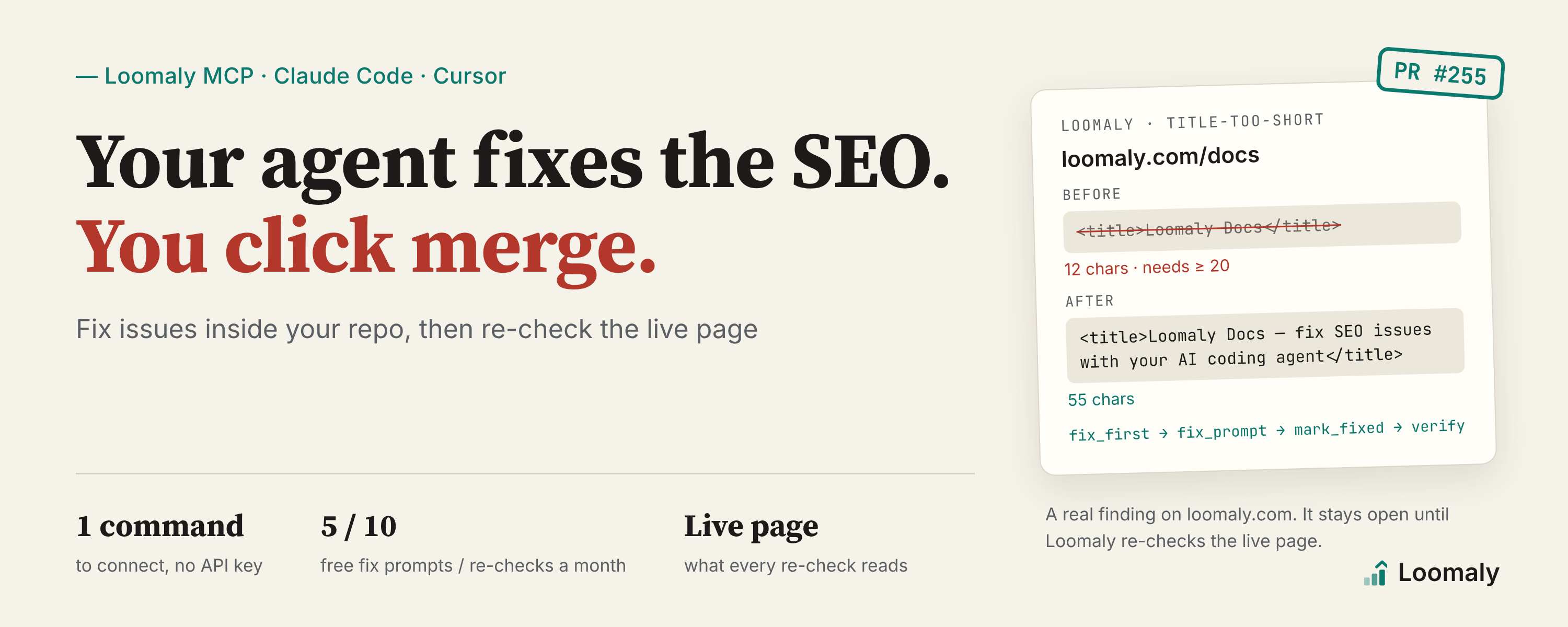
The scan on October 18 flagged /docs, our docs homepage. Its <title> was just "Loomaly Docs": 12 characters, under the 20 the rule asks for. todo listed it third for the site, with Search Console behind it:
{
  "position": 3,
  "ruleId": "title-too-short",
  "severity": "warning",
  "affectedPages": 4,
  "sampleUrl": "https://loomaly.com/docs",
  "reason": "costs_traffic",
  "searchImpressions": 11,
  "scoreGain": 0.4
}
problem returned the evidence ("snippet": "Loomaly Docs", "actual": "12 chars") and an instruction written for our framework, TanStack Start: put the title in the route's head() and make it 50 to 60 characters that cover the topic.
The agent found that the docs index has no page title of its own, so the section name was being used as the whole <title>. Its change:
+const INDEX_TITLE: Record<DocsLocale, string> = {
+	en: "Loomaly Docs — fix SEO issues with your AI coding agent",
+	zh: "Loomaly 文档 — 用你的 AI 编程助手修复 SEO 问题",
+};
 ...
-	if (!data) return { meta: [{ title: SECTION[lang] }], links: [stylesheet] };
+	if (!data)
+		return { meta: [{ title: INDEX_TITLE[lang] }], links: [stylesheet] };
I read the PR and merged it, and it deployed. Then the agent called check with target: fix and the PR URL as ref. About a minute later the result came back:
{
  "status": "verified",
  "findingState": "fixed",
  "verdict": "fixed"
}
The finding closed, because the live page now has the long title, not because someone said it was done.
The health score read 96 before the re-check and 96 after. That's honest, not a bug: todo put the gain for this whole rule at 0.4 points, and the same rule is still open on three Chinese pages. Fixing one page of four doesn't round up to a point.
What it can't do
I use this loop every day, and I know where it stops:
- Loomaly never changes your site. The agent changes the code in your repo; you review it and you deploy it. The only things the MCP tools can change live inside Loomaly, like an issue's status or an entry in the change log.
- The fix instruction isn't guaranteed to work as-is. It's written from your public pages, so it can't know how your project's files are laid out. An agent that can read your actual code does much better than the instruction alone, but you still need to read the PR.
- Some issues can't be closed by a re-check. AI-judged ones, like "two pages competing for the same search", wait for the next full scan to be judged again.
- Claude on the web and the Claude mobile app can't change code. They can connect to Loomaly too, and they'll walk you through the fix in Shopify or WordPress. To have AI change the code for you, use Claude Code, Codex or Cursor.
How far the free plan goes
Free gets you one site, a full scan, and a $0 monthly data budget (no paid rankings or AI mentions). Fix checks still cover re-checking after you ship. That's enough to fix the few issues that matter most. See Plans.
Full setup, including Codex, ChatGPT, the Claude app and other clients, is in Connect your AI assistant.
Want to see what your site would report first? No sign-up, nothing to install:
Check your own site
Free, no sign-up. We read your sitemap and about 20 pages.